We turned a perfectly good protocol back into a string, and I'd probably do it again
How GetPullRequest streams a coding agent's replies, tool cards and diffs into a Flutter app live, why Flutter's GenUI didn't fit, and what we changed in streaming_gen_ui to make it work.
I want to talk about the dumbest-looking decision in our Flutter app, because I've gone back and forth on it more times than I'd like to admit, and because defending it taught me most of what I now know about how Flutter behaves under pressure.
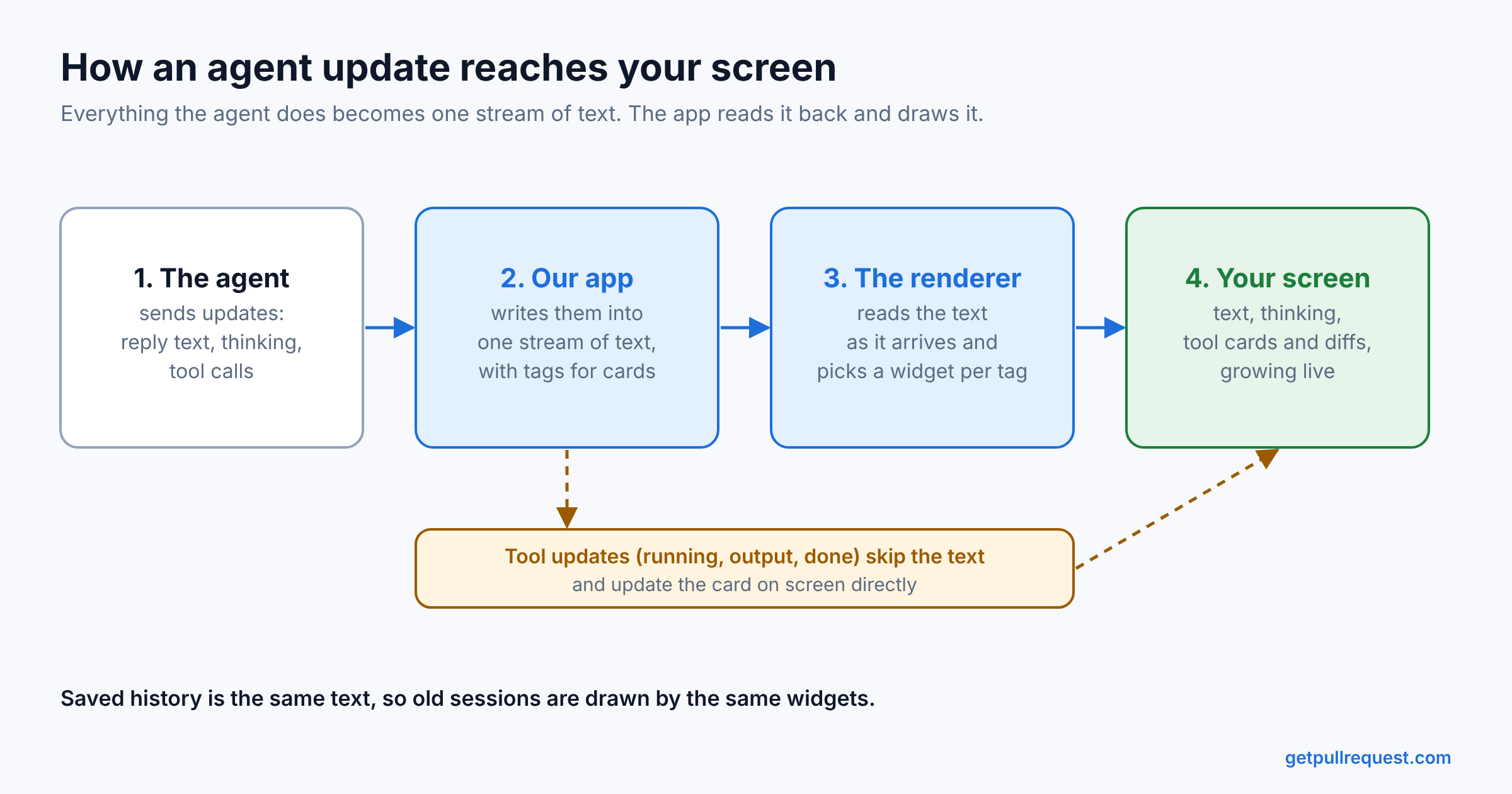
Some context first. We build GetPullRequest. A coding agent (Claude Code, Codex, Cursor, whatever you already pay for) runs on your own machine, and you watch it and talk to it from your phone. The phone app is Flutter. The agent speaks the Agent Client Protocol, which means everything it does arrives as nicely typed JSON-RPC frames: here's a piece of my reply, here's a piece of my reasoning, I've started a tool, that tool's status changed.
Typed frames. Clean discriminated unions. Exactly what you'd want.
And the first thing our app does with them is flatten them into one long string.
The string
Every agent turn gets its own Stream<String>. The phone app writes to this stream, not the agent. The agent never sees any of this. It just sends normal ACP messages.
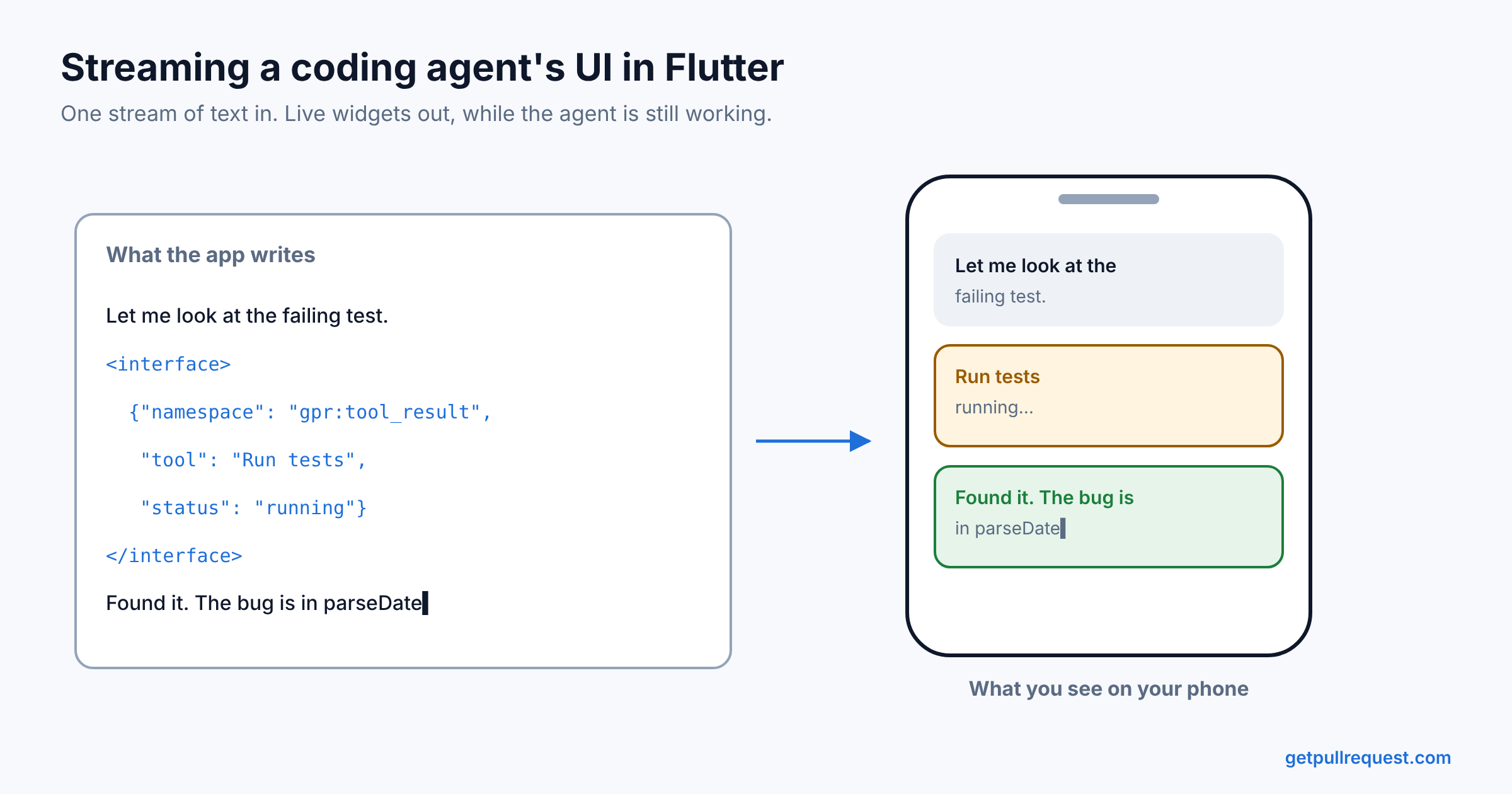
When a message arrives, one Dart class in the app (AcpChatService) decides what to do with it. The agent's reply text goes into the stream as it is. Everything else, like a tool card, a diff, terminal output, a permission prompt or the agent's thinking, gets wrapped by the app in a small <interface> tag with some JSON inside. So the stream looks like this:
Let me look at the failing test.
<interface>{"namespace":"gpr:tool_result","tool_call_id":"t7","tool":"Run tests","status":"running"}</interface>
Found it. The bug is in `parseDate`.
Then, on the rendering side, a tag parser splits the string back into text and tags. A streaming JSON parser reads the properties inside each tag. And a registry looks at the namespace (here gpr:tool_result) and picks the widget to show.
So we take structured data, turn it into text, and then parse the text back into structured data, all inside the same app. If I saw this in a code review with no context, I would ask what happened.
Why we didn't use Flutter's GenUI
Flutter does have its own package for this, called GenUI. We tried it first. We had to stop using it for one reason: it only drew the UI after the model's full response had arrived and been parsed.
In a normal chat app, that means looking at a spinner for a few seconds. For a coding agent whose turn can run for twenty minutes, it doesn't work at all. When the agent starts running a tool, you want to see the tool card right away, not after the agent is finished.
The GenUI team knew this. Their own README lists "Streaming UI: Support for progressively rendering UI components as they stream from the LLM" under things they're thinking about, and it has been on that list since August 2025. It's not an easy thing to add. GenUI would need a JSON parser that can handle half a response. It would need placeholders for widgets that refer to other widgets that haven't arrived yet. And it would need fields in the right order so the top-level widget shows up first.
Other Flutter developers hit the same wall. When GenUI was first shared on r/FlutterDev, one developer wrote that "the only pain point I've run into is being able to stream the widgets, doing real-time incomplete json parsing is a PIA."
Where the <interface> syntax comes from
We didn't invent the <interface> tag. We took it from streaming_gen_ui, a small Flutter package that its author introduced on r/FlutterDev as "a simpler and streaming version" of GenUI. Its README describes our problem with GenUI almost word for word: "Most generative UI packages require you to wait for the complete JSON payload before decoding and popping the final widget tree onto the screen."
The idea is simple. A model writes normal text, and when it wants a widget, it writes a tag with JSON inside:
<interface>{"namespace":"gpr:code_block","language":"dart","code":"..."}</interface>
The package reads the stream as it arrives. It uses llm_tag_parser to separate the text from the tags, and llm_json_stream to read the JSON inside a tag before the tag is complete. As soon as the namespace field arrives, it picks the matching widget and shows it. The rest of the fields fill in as they stream. Both parsers come from the same author, and we use llm_json_stream directly in our app too.
We first used this to let a language model write UI directly. You can still see that in our config, which has instructions for the model like "ALWAYS use gpr:code_block instead of markdown code fences". When we moved to ACP agents, we already had a renderer that could grow a tool card or a code block line by line. So instead of building a new one, we made the app write the agent's messages in the same <interface> format.
What we changed to make it work for coding agents
streaming_gen_ui was built for a chatbot-style reply: the user asks something, the model answers in a few seconds, and the answer has a handful of widgets in it. A coding agent works very differently. One turn can run for an hour. In that time the agent reads files, runs commands, edits code and runs tests, and every one of those steps shows up as a card. Between those steps it also thinks out loud. That reasoning streams into its own thinking widget, which stays open while the agent is thinking and folds itself away as soon as the agent starts replying or runs a tool. A single turn can end up with hundreds of tool cards, long terminal output and a few very large diffs, all streaming in while you scroll. The package's README is also honest that it "does not manage conversations, pipelines, or tooling", and for us, tooling is most of the screen. So we keep our own copy of streaming_gen_ui in our repo and changed a few things.
It rebuilt on every chunk. The original calls notifyListeners() every time a piece of text arrives. With an agent streaming fast, that meant rebuilding many times a second. Our copy groups these into one notification per microtask. The logic is a single flag. When a chunk arrives, we check if a notification is already scheduled. If it is, we do nothing. If not, we set the flag and schedule one with scheduleMicrotask. When that microtask runs, it clears the flag and calls notifyListeners() once.
bool _notifyScheduled = false;

void _scheduleNotify() {
  if (_notifyScheduled) return; // one is already on the way
  _notifyScheduled = true;
  scheduleMicrotask(() {
    _notifyScheduled = false;
    notifyListeners();
  });
}
A microtask runs as soon as the current piece of Dart code finishes, before the event loop moves on to the next event or the next frame. So if the parsers push twenty chunks in one go, all twenty are added to their blocks first, and the listeners hear about it once. Nothing is delayed by a timer, and the screen never shows a state that is out of date.
It drew the whole reply as one widget. The original puts every block of a reply inside one Column. For a short answer that's fine. For a long turn, Flutter had to build all of it whenever any part was on screen. Our copy can build one block at a time, so each block becomes its own row in the chat list, and Flutter only builds the rows you can see.
The tags were written by a model, not by us. In the original, the model writes the tags. In our app, the agent never sees them. The app's AcpChatService receives the agent's ACP messages and writes the tags itself: one for each tool card, diff, terminal output or permission prompt. The agent's reply text goes in as normal markdown.
Tool calls change after they start. The original only adds to the stream. It never goes back and changes a widget. But a tool call starts as "running" and then gets updated several times. We had to build a way to update a card that is already on screen. More on that below.
We dropped what we didn't need. The package ships with many themed widgets, like weather cards and product results. We removed them and registered our own gpr: widgets instead.
Why the string stayed
Turning typed messages back into a string still looks odd. But we kept it for one reason I'm really happy about: the saved history uses the same string.
When you open a session again the next day, the saved transcript is the same markup, drawn by the same widgets. We don't have one renderer for live sessions and another for history that slowly drift apart.
It also helps when a turn ends. We fetch the saved version of that turn and swap it in for the live one. If the network dropped a message somewhere, say while you were in a tunnel, the missing part just appears. You never notice.
I'm still not sure this is worth the strangeness. Some days I think we should remove it and draw the typed messages directly. Then I think about maintaining two renderers, and I change my mind. If GenUI gets proper streaming one day, I would seriously think about moving back.
With the renderer working, the next problem showed up quickly: the text itself.
Text gets cut in the wrong places
The problem with streaming text is that it never gets split where you want. A chunk can end in the middle of a word, in the middle of a markdown table, or in the middle of the three backticks that start a code block.
Here's a simple example. Say the agent wants to send this reply:
Here's the fix:
```dart
final total = price * qty;
```
It doesn't arrive in one piece. It might arrive as three chunks like these:
chunk 1:  "Here's the fix:\n`"
chunk 2:  "``dart\nfinal total = pri"
chunk 3:  "ce * qty;\n```"
If you render the text after every chunk, this is what the user sees:
- After chunk 1, a stray backtick at the end of the sentence.
- After chunk 2,
dart final total = prias plain text, because there is no complete code block yet. - After chunk 3, the text suddenly turns into a proper code block with syntax highlighting.
So for a moment the screen shows something that was never in the reply. With short replies it's a flicker. With a long code block streaming for several seconds, it looks broken.
I knew this in theory, but I only really understood it after watching it happen on my own phone, in a long code block, over and over.
We fixed this with a small class called AgentMessageTextAssembler. It watches the reply as it streams in. As soon as it sees a complete opening fence, like ```dart, it starts a code block tag and sends the code into it bit by bit. So the code block appears straight away and fills in as the code arrives.
The tricky part is the end of each chunk. If a chunk ends with one or two backticks, they might be the start of a fence. So the assembler holds back just those characters until the next chunk arrives and makes it clear.
final ticks = _trailingBacktickCount(text);
if (ticks == 1 || ticks == 2) return ticks; // not sure yet, keep these back
JSON code blocks are harder, because agents often forget to close them. For those, the assembler counts brackets and quotes. If the JSON looks complete and the next text looks like a normal sentence, it stops waiting for a closing fence that will never come.
How does it decide that the next text "looks like a sentence"? A regex checks if it starts with a letter, # or *. It's a rough rule, but it works.
Plain markdown had its own version of this. Our chat renders the agent's text one line at a time, so you can tap any line and comment on it. Most markdown doesn't care. But some of it only works when the lines are read together. Here are the three cases that bit us.
A table. The agent writes:
| File        | Change   |
|-------------|----------|
| auth.dart   | +12 -3   |
| login.dart  | +40 -18  |
A table only works when all its rows are read together. We were reading one row at a time, so instead of a neat table, the user saw four lines of plain text with | symbols scattered through them.
A code block. The agent writes:
```dart
final user = await auth.signIn();
print(user.name);
```
The three backticks at the top and bottom tell markdown where the code starts and ends. But we were reading one line at a time, so each line had no idea it was part of a bigger code block. Instead of one code box with both lines inside it, the user saw each line in its own small gray box, one under the other.
A nested bullet. The agent writes:
- Backend
    - add the refresh endpoint
    - return 401 on expiry
This one surprised me. In markdown, four spaces at the start of a line means "this is code". So when the second line is read on its own, it isn't a bullet anymore. It showed up as a gray code chip with a literal - in front, cut off at the edge of the screen.
The fix, splitMarkdownBlocks, groups lines into prose, tables and code blocks before rendering, so tables and code stay in one piece. Two small rules make it work. A code fence only counts once it's closed, because agents forget to close them and one stray fence shouldn't turn the rest of the reply gray. And indented lines lose their indent before parsing and get it back as padding, so a nested bullet is a bullet again.
Then there was the "ThisThis" bug. Some sources send only the new text each time: "This", " is", " fine". Others send the full text so far each time: "This", "This is", "This is fine". Some switch from one to the other halfway through, and a replay can send the same text twice. If you just append everything, the screen shows "ThisThis is fine".
Now every widget that builds up streamed text uses a small function called mergeStreamedText. It checks whether the new chunk is the full text, an old repeat, or new text that overlaps with what we have. Only if none of those match does it simply append. It's about twenty lines, and it fixed more bugs than anything else in this post.
When the string isn't enough
A string that only grows works well until something needs to change. And tool calls change.
The agent says "I'm running the tests". Then, over the next minute, it updates that same tool call several times: still running, here's some output, done, here's the result.
My first idea was to keep the tool's tag open and stream the updates into it. That worked until an agent ran two tools at the same time. The two open tags got mixed up, and raw JSON showed up in the chat.
So now we write one complete card per tool into the string, with the tool's id in it. After that, updates for that tool never go into the string. They go through something we call the ToolCallLiveBus.
"Bus" sounds fancy, but the idea is simple. It's a shared channel inside the app. One part of the app drops messages into it, and any widget that cares can listen. In our case, AcpChatService is the only one dropping messages in. Every time the agent sends an update for a tool, it publishes the tool's id and whatever changed: the new status, some new output, or both. The tool cards are the listeners. Each card only listens for its own id.
The whole thing is about seventy lines of Dart. It has two parts: a broadcast StreamController that sends each update to whoever is listening, and a map that remembers the latest state of every tool.
static void publish(String toolCallId, ToolCallLiveUpdate update) {
  final merged = (_latest[toolCallId] ?? const ToolCallLiveUpdate()).merge(update);
  _latest[toolCallId] = merged;   // remember the latest state
  _controller.add(MapEntry(toolCallId, merged));   // tell the listeners
}
Updates usually only carry the fields that changed. So before sending one out, the bus merges it with what it already knows about that tool. That way a listener always gets the full current state, not just the latest piece.
The map matters because a card isn't always on screen when an update arrives. When a card is built, it first asks the bus for the latest state of its tool, and only then starts listening for new updates. So a card that appears late, or gets rebuilt after you scroll back to it, still shows the right status.
I'll admit two things about this.
First, the bus is a static global. There is only one of it, and any code in the app can publish to it. That's not great design. It works because Dart runs all of this on a single event loop, so two updates can never run at the same time. We don't need locks, and updates are handled in the order they arrive. But a global like this is harder to test, because every test shares the same bus.
Second, it means the "everything is one string" idea is no longer fully true. The string holds the structure, and the live state travels next to it. It's a compromise. I think it's the right one, but it is a compromise.
We had a similar problem with large content. Parsing JSON one character at a time is great for a small card, because you can show the card as soon as its name arrives. But it's bad for a diff that's tens of kilobytes long, because the parser does work for every single character on the UI thread.
At one point, a big diff made the rest of the turn look frozen. New messages were still coming in, but nothing after the diff showed up until you left the session and opened it again.
Now, any long string in a heavy field (like code or output) is saved in a separate in-memory store, and the tag only carries a short id pointing to it. The limit is 4096 characters. Why 4096? Honestly, it's a nice round number and it fixed the problem.
The main thread on Android
When I started with Flutter, I thought of the UI thread as just a Flutter thing. On Android it's more than that. The isolate that runs your widgets is the app's main thread. That's the same thread that has to respond to touches. If it's busy for too long, Android decides the app is stuck. We learned this after seeing the "app isn't responding" dialog twice.
The first time was because of keep-alives. Some background first. A Flutter ListView normally only builds the rows you can see. When a row scrolls off screen, Flutter throws it away to save memory, and builds it again if you scroll back. "Keep-alive" is a Flutter setting that tells the list not to throw rows away. The row stays in memory even when you can't see it.
We had keep-alive turned on for every row, so that a card you expanded would still be expanded when you scrolled back to it. In a long session, that meant the whole conversation stayed in memory, hundreds of rows. When you rotated the phone, Flutter had to measure and lay out every one of those rows again for the new screen size, all on the main thread. That took too long, and Android killed the app.
We turned keep-alive off and also made the list build only a small area beyond the visible screen. Rows that scroll off screen are now thrown away and rebuilt when you come back. This is also why the tool bus keeps the latest value for each id. If a card scrolls away while its tool is still running, it gets rebuilt later, after its last update has already passed. Without that saved value, it would show "running" forever.
The second time was when opening an old session. To turn a long saved transcript back into rows, we have to split the text and run jsonDecode on hundreds of tags. We were doing this on the main thread. Dart made the fix very easy:
final parsed = await Isolate.run(() => parseHistorySegmentMapsBatch(texts));
That's all. You pass a function in and get a Future back. You don't need a separate worker file or any message passing setup.
Short transcripts are still parsed on the main thread, because starting an isolate takes longer than parsing something small. We move to an isolate when the text is over 12,000 characters or has more than 24 tags. Like the 4096 limit, we picked these numbers because they worked, not because of any careful math.
Another thing that didn't scale was treating one reply as one message. Every chat UI I had built before showed one bubble per reply. But an agent's reply can contain hundreds of tool cards and a few very large diffs. If all of that is one list item, Flutter builds the whole thing whenever any part of it is on screen.
So now each block in a turn is its own row in a reversed ListView. Each row has a stable key, so when new rows arrive at the bottom, Flutter moves the existing rows instead of rebuilding them. The row types are a Dart 3 sealed class. When I added a new row type, the compiler showed me every switch I had forgotten to update. That alone made me like sealed classes a lot.
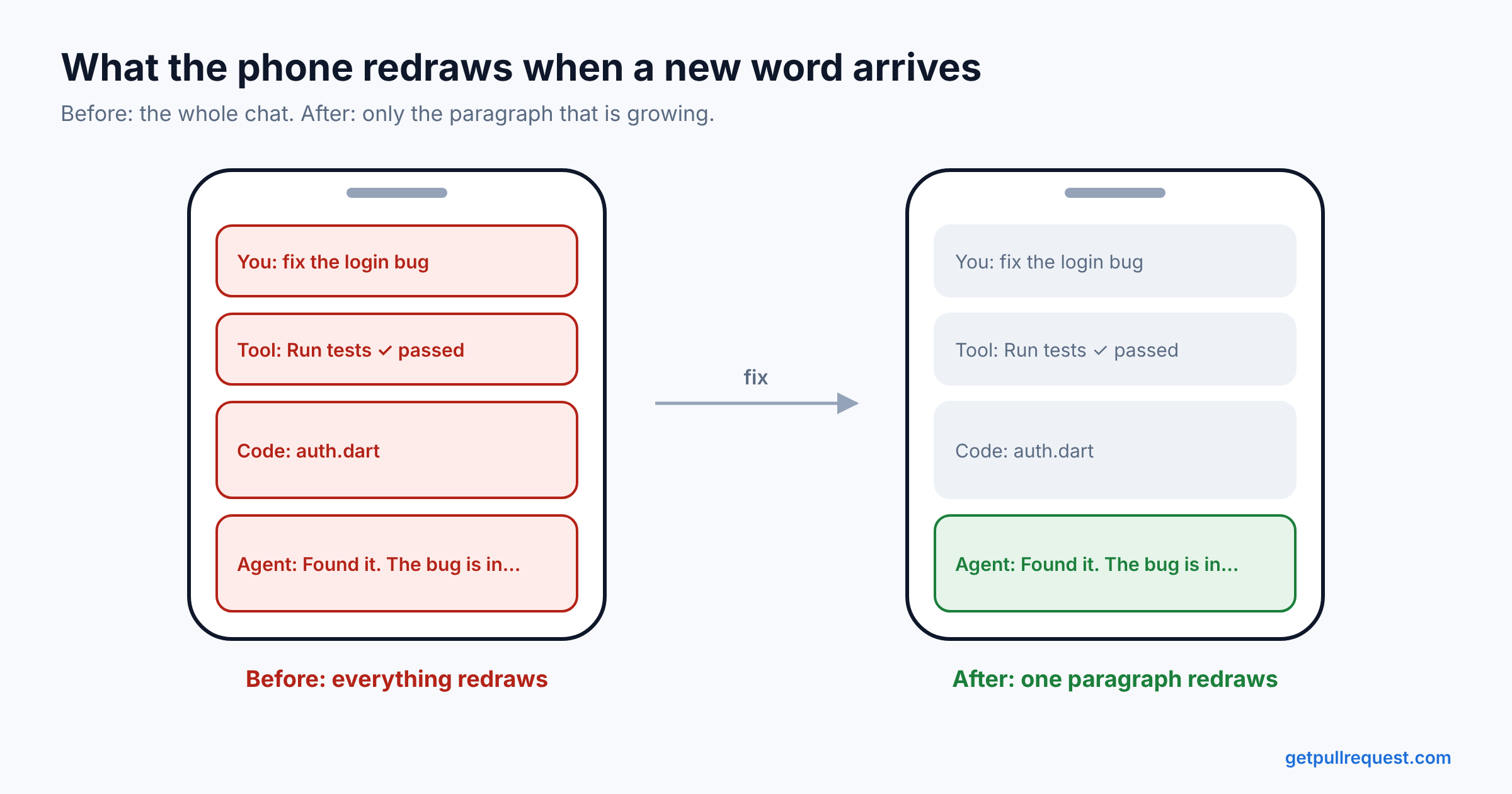
Then there were the rebuilds. The rendering engine is a ChangeNotifier, and for a while our chat page listened to it directly. So every chunk rebuilt the whole list, many times a second, even while you were scrolling.
We found this with a small debug tool that hooks into SchedulerBinding.addTimingsCallback. It logs slow frames and counts rebuilds. The log was full of LIST rebuild ... rebuild_while_scrolling lines.
The fix had four simple parts:
- Group notifications so the engine notifies once per microtask instead of once per chunk.
- Make the page read the engine instead of watching it.
- Rebuild the list only when the number of blocks changes.
- Let the paragraph that is actually growing call
setStateon itself.
If I had to pick one idea from this whole post, it would be this: the widget that owns a stream should be the smallest widget that shows it.
Things I'm still not sure about
Scrolling, mainly. A reversed list makes sense for chat, because the newest message is at the bottom. But it has some odd behavior.
When you expand a card, its header jumps up, away from your finger. To fix that, we measure the card before the change, and after the frame we move the scroll position by the difference in height.
When you collapse a big card, Flutter has already adjusted the scroll position before you can fix it. So you have to remember where you were before the change.
We only auto-scroll to new content if you're within 200 pixels of the bottom. That number is a guess. It feels right on my phone, but it's probably wrong on a tablet.
I'm also not sure that keeping our own copy of the engine is the best long-term plan. We've changed our copy quite a bit, for things like grouping notifications and rendering one block at a time for the list. Every change makes it harder to upgrade. I'd like to send some of these changes upstream, or build something smaller that only does what we need.
And I'm still not sure about the string itself.
Would I pick Flutter again?
Yes, but for a different reason than why we picked it. We chose Flutter so a small team could ship one app on both Android and iOS. What I didn't expect was how well Dart fits this kind of streaming problem.
Streams are part of Dart's core library, so we didn't need any extra package for them. Broadcast controllers, Stream.multi for sending old data to a late listener, and async all worked well together. Dart's single event loop made our global bus safe without locks. When we needed real parallel work, Isolate.run did it in one line. Sealed classes caught mistakes before they shipped. And when we needed lower-level tools, like post-frame callbacks, render box sizes and frame timings, Flutter already had them.
The one thing Flutter didn't do was stop me from making wrong assumptions about the main thread. That one's on me.
If you're building something that shows streamed AI output in Flutter, I'd really like to compare notes, especially if you've found a better answer to the string question than we have. And if you want to see all of this working with your own agent, GetPullRequest is free to try.